A Maker's Perspective on the Easter Bunny Lily Garden Shadow Box
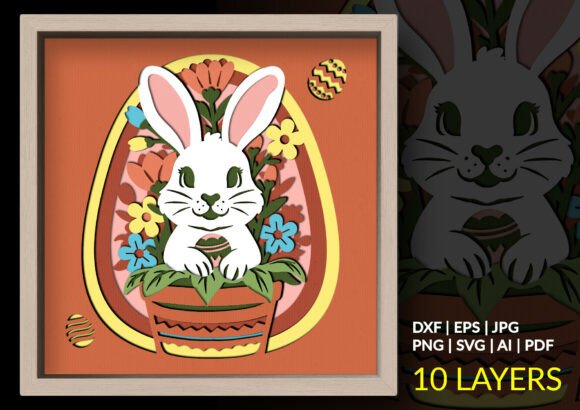
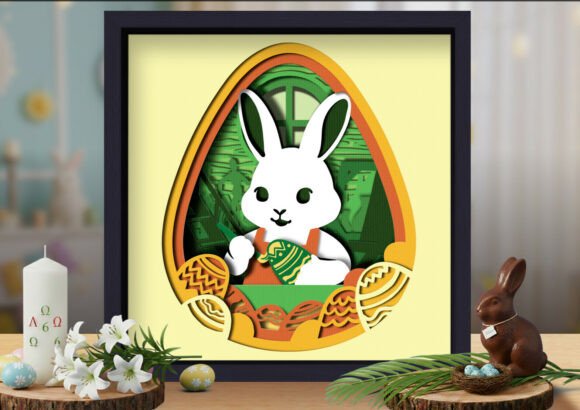
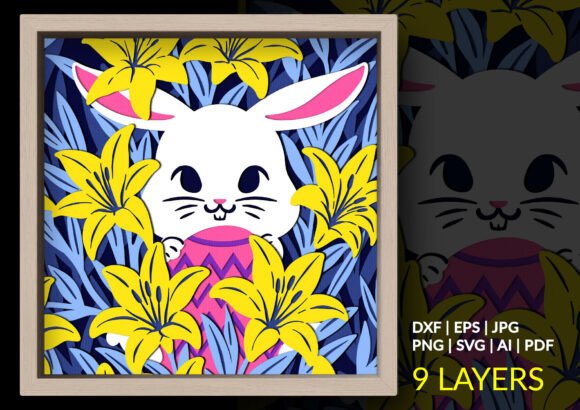
When you spend enough time working with layered paper designs, you develop a sense for which files will translate beautifully from screen to physical object and which ones will fight you every step of the way. The Easter Bunny Lily Garden Shadow Box falls firmly into the first category. It is a 9-layer papercut design that builds into an 11-layer dimensional scene featuring a white rabbit nestled among oversized yellow lilies against deep blue foliage. The composition captures a specific moment—late morning light, a garden in full bloom, and a figure of gentle curiosity—without veering into saccharine territory.
What the Design Actually Delivers
This is not a generic spring clip-art collection. The file set is built around a single, cohesive composition engineered for depth. Nine distinct cutting layers stack to produce eleven visible strata of detail when assembled with foam spacers or adhesive dots. The bunny occupies the middle ground, partially obscured by lily petals that project forward. Leaves recede into cooler blue tones, creating atmospheric perspective that reads as intentional rather than accidental.
The color logic deserves attention because it solves a practical problem many layered designs ignore. High-contrast paper choices—bright yellow petals, navy to teal foliage, soft white for the rabbit—mean the piece holds its visual integrity even in flat or indirect light. You won't need museum-grade spotlights to make the layers read. This matters if the finished shadow box ends up in a nursery corner, a hallway, or any space without carefully planned illumination.
File Format Coverage and Practical Compatibility
One of the quieter frustrations in the cutting machine community is downloading a file only to discover it exists solely in a format your software handles poorly. The maker behind this design has covered the major bases without overcomplicating the package. You receive SVG, which is the native language of Cricut Design Space and works smoothly with Silhouette Studio Designer Edition and Adobe Illustrator. The DXF file addresses Silhouette users on the free Basic Edition, who would otherwise be locked out of SVG imports. EPS and AI files provide editable source material for anyone who wants to tweak colors, rescale elements, or adapt the composition for a different palette. A high-resolution PNG at 300dpi on a transparent background serves print-and-cut workflows or manual tracing, and the PDF gives you a print-at-home reference for manual assembly or hand-cutting if you prefer traditional methods.
This breadth of formats indicates that the designer understands something important: crafters inhabit different ecosystems. Some are fully digital with Cricut or Silhouette machines. Others use laser cutters and need clean vector paths. A portion still work with scissors and cardstock. Providing files that bridge these methods without redundant clutter shows practical restraint.
Depth Engineering and Layer Logic
The jump from flat paper art to convincing three-dimensional shadow boxes depends almost entirely on how the layers relate to one another. Poorly planned designs stack uniformly, producing a stepped-terrain effect that looks mechanical. The Easter Bunny Lily Garden Shadow Box uses variable offset distances and selectively overlapping elements to create believable depth without requiring impossible precision during assembly.
What this means in practice is that the lily petals in the foreground extend forward enough to cast actual shadows onto the layers behind them. The blue foliage sits further back, framing the scene without competing for attention. The rabbit itself is positioned at an intermediate depth, partially masked by foreground elements and partially revealed. This layering strategy mimics how our eyes perceive depth in real gardens—objects overlap, recede, and emerge in ways that feel organic.
For the maker, this engineering translates into a project that forgives small alignment variations. If one layer shifts a millimeter during assembly, the overlapping elements disguise the discrepancy rather than amplifying it. This is the mark of a design that has been tested in physical form, not just rendered on a screen.
Material Considerations and Cutting Performance
The design is optimized for clean cutting across multiple machine types, which is a claim worth unpacking. File optimization for cutting means path simplification where appropriate, closed shapes that don't produce unexpected open segments, and node counts that balance detail against machine speed. Overly complex paths slow cutting, increase the risk of snagged paper, and frustrate users who watch their mats feed back and forth for twenty minutes on a single layer.
Based on the file structure, the layers here are detailed enough to reward close inspection but not so dense that they punish you with weeding nightmares. Cardstock in the 65lb to 80lb range should handle the cutting well. For laser users, thin plywood or acrylic in 1/16-inch or 1/8-inch thicknesses would produce a more permanent piece, though testing on scrap material first is always advisable when moving between mediums.
The design's reliance on color contrast for depth means you can use solid core cardstock rather than searching for specialty papers with metallic finishes or textured surfaces. Standard smooth cardstock from brands like Astrobrights, Recollections, or Bazzill will reproduce the intended effect reliably.
Assembly Complexity and Time Investment
A nine-layer shadow box sits in the intermediate-to-advanced range for papercraft projects. Beginners can certainly attempt it, but they should budget additional time and expect a learning curve with the dimensional spacing. The assembly process involves cutting all layers, arranging them in order, applying foam adhesive squares or tape between each layer, and aligning the stack. With eleven visible depth levels, you will use a meaningful number of spacers. Adhesive foam dots in 1/16-inch and 1/8-inch thicknesses give you control over the spacing increments.
Expect to spend two to three hours from unboxing the download to displaying the finished piece, assuming you are comfortable with your cutting machine and have materials on hand. Hand cutters should anticipate a longer session spread across multiple sittings to avoid fatigue.
One practical recommendation is to cut a spare of the most detailed layer. If a delicate section tears during assembly or an adhesive dot lands where it shouldn't, having a backup eliminates the need to recut an entire sheet. Paper is inexpensive; redoing a single layer because of a preventable mistake is frustrating.
Who Will Find the Most Value Here
This design speaks to several overlapping audiences. Home decor crafters seeking seasonal pieces that avoid cartoonish Easter motifs will appreciate the botanical emphasis. The lilies dominate the composition; the bunny is present but not the sole focus. This makes the finished shadow box suitable for display well beyond the spring holiday window. It reads as a floral garden piece with a whimsical element rather than a strictly seasonal decoration.
Gift makers will find this useful as a present for new parents, grandparents, or anyone who responds to garden imagery. A handmade papercut shadow box communicates effort and consideration in a way that mass-produced decor cannot. The floral subject matter also makes it appropriate for Mother's Day gifting, extending its utility beyond Easter.
Small business owners who sell at craft fairs or through online marketplaces can use the included commercial licensing (confirm specifics with the seller) to produce finished shadow boxes for resale. The design's visual impact relative to its material cost is favorable—cardstock, adhesive, and a shadow box frame from a craft supply store represent a manageable per-unit cost for a product that commands premium pricing in the handmade decor market.
Educators and workshop leaders teaching layered paper techniques might use this as an intermediate project. The file variety means students can access the design regardless of their software limitations, and the predictable layer logic makes it a good teaching example for discussing depth, color selection, and assembly sequencing.
Color Customization and Creative Flexibility
The default palette—yellow lilies, blue foliage, white bunny—is well chosen, but the design does not lock you into those choices. Because you are cutting individual layers from cardstock, you control the final color story entirely. Switch the lilies to pink and the foliage to sage green for a softer look. Use cream and gold tones for a more neutral palette that suits minimalist interiors. Select deep purples and silvers for an evening garden interpretation. The structural design remains sound regardless of color shifts, which is a significant advantage over pre-printed kits that cannot be adapted.
Laser users working with wood can stain layers differently, paint sections by hand, or leave the material natural and rely on the depth alone for visual separation. Acrylic users might experiment with translucent and opaque layers, adding colored LED backlighting for a completely different presentation style. These adaptations don't require modifying the vector files themselves—they come from material and finishing choices made during production.
Realistic Limitations to Consider
No design file is perfect for every situation. The layer count here means material consumption is not trivial. Nine sheets of cardstock, plus adhesive, plus a frame, adds up. This is not a budget project if you are producing multiple copies, though the per-unit cost remains low compared to purchasing finished decor of comparable visual weight.
The design assumes access to a cutting machine for practical results. While the PDF enables hand cutting, the intricate petal shapes and leaf details would test the patience and precision of even experienced hand cutters using a craft knife. Those without electronic cutting tools should realistically evaluate their tolerance for detail work before purchasing.
Assembly requires attention to order and orientation. The files do not include pre-numbered registration marks on every layer, so you must keep your cut pieces organized and refer to the assembly guide. This is standard practice for layered SVG files and not a flaw, but it is worth noting for those new to the format who might expect a fully guided, color-coded kit experience.
Frame sizing also deserves a moment of thought. The finished stack thickness, with foam spacers between layers, can exceed half an inch. Standard shadow box frames with removable backs and adequate depth clearance work well. Thin poster frames or document frames without depth accommodation will not close properly. Measure your intended frame against the assembled thickness before committing to a display method.
How This Compares to Similar Market Options
The layered papercut SVG market has grown considerably, and shoppers now face an overwhelming number of options. Many designs offer similar spring and Easter themes: bunnies, flowers, pastoral scenes. What distinguishes this particular file set is the attention to depth gradation and the color-blocking approach that uses bold contrasts rather than subtle tonal shifts. This aesthetic choice makes the finished piece more legible at a distance—a practical consideration for wall-mounted decor viewed from across a room.
The inclusion of DXF and EPS formats alongside the more common SVG and PNG options also indicates a designer who understands that paying customers use varied software. Many competing products ship with SVG and PNG only, leaving Silhouette Basic Edition users empty-handed. This broader format support reduces friction and the need for file conversion workarounds.
Long-Term Value and Reusability
A digital cutting file is not a single-use product. Once purchased, you can cut the design repeatedly for personal projects, gifts, or commercial production depending on the license terms. The Easter Bunny Lily Garden Shadow Box can become a recurring seasonal make—cut it in different colorways each year, scale it up or down for varied frame sizes, or modify selected layers to create variants. The AI and EPS files support deeper customization for those with vector editing skills, while the ready-to-cut SVG and DXF files serve users who want a direct path from download to machine.
This reusability is central to the value proposition of digital design files. A physical decor item is consumed once. A well-made cutting file becomes a tool in your creative library, available whenever inspiration or occasion calls for it. Over time, the cost per use approaches zero, which is a compelling argument for crafters building a collection of reliable, tested designs.
For makers who value projects that look more complex than they actually are, this design hits a sweet spot. The layered construction does the visual heavy lifting. Assembly follows a logical sequence. The materials are accessible and the tools are common. The result is a piece that invites viewers to lean in and examine the depth, the color interplay, and the small details of petal and leaf shapes that reward that closer look. In a craft landscape increasingly dominated by quick-turn trends, designs built on solid structural principles and thoughtful composition have genuine staying power.